ChromaPrint AI Review (2026): Honest Assessment After Real Use
Quick Answer
ChromaPrint AI does one specific thing well: converting personal photos into clean, print-ready coloring page line art. It is not a general image editor or illustration tool. For portraits of people, pets, and real-world scenes, output quality is consistently usable without manual cleanup. It does not work well on heavily backlit, blurry, or very complex group photos. The free preview lets you test your specific photo before spending any credits.

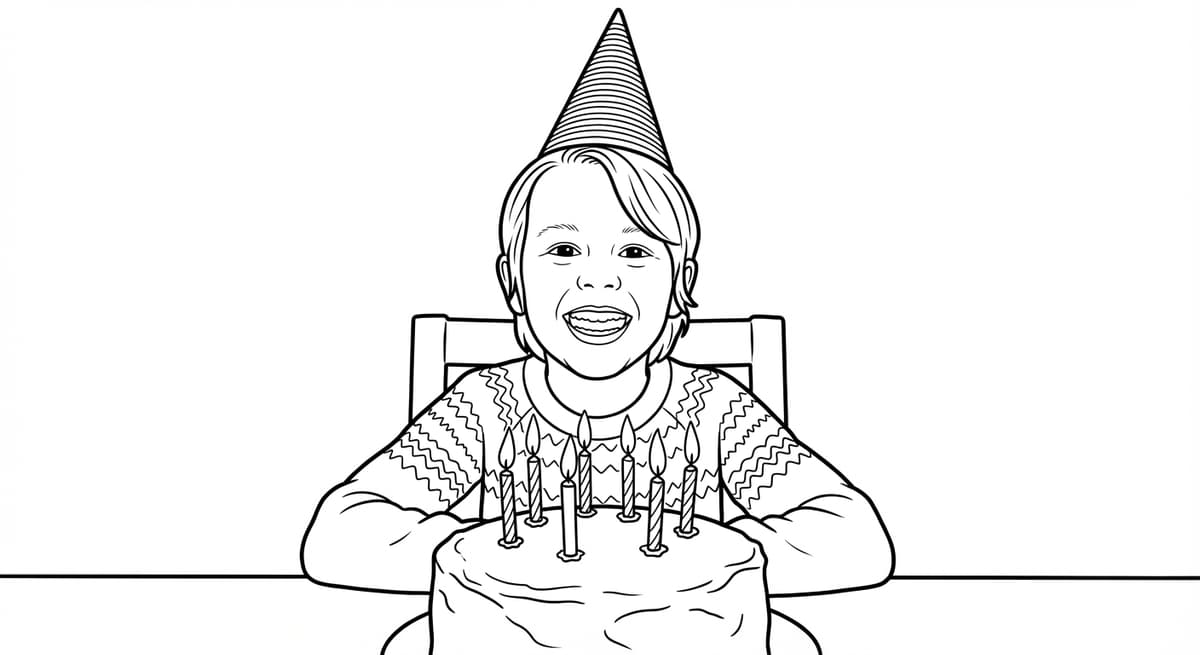
The photo-to-coloring-page category has grown significantly since AI image models matured enough to extract clean line art from real photographs - a technically harder problem than generating art from text prompts. Unlike text-to-image generators such as DALL-E 3 or Midjourney, which produce generic illustrations from text descriptions, ChromaPrint AI takes a real photograph as input and must preserve the identity of the subject - a specific person, pet, or scene - in a clean black-and-white line drawing. This review covers what the product does well, where it falls short, how the pricing stacks up, and who is the right user for it - and who is not.
What It Does Well
- Line art quality is genuinely good. The output is clean, bold line art - not a filtered photo with noisy edges. The AI preserves the face and pose of the subject in a way that Photoshop filters and simple online converters do not. For portraits of people and pets, the results are consistently usable without any manual cleanup.
- Free preview before payment. Every upload generates a watermarked preview at no cost. You see the full output before deciding whether to spend a credit. This removes the risk of paying for a result you are not happy with.
- Fast turnaround. Generation takes 15–45 seconds. For a family photo or pet portrait, you have a preview in under a minute.
- Print-ready output. The downloaded file is 300 DPI and sized for standard US Letter or A4 printing. It prints well on home printers with standard cardstock - no additional image editing needed.
- Multiple style options. Style variants - from simplified (toddler-friendly) to high-detail (adult artist) — give meaningful control over the output. The difference between styles is substantial, not cosmetic.
What It Does Not Do
- Difficult photos produce inconsistent results. Heavy backlighting, motion blur, very complex backgrounds with overlapping subjects, and low-resolution photos (under 800px on the short edge) all reduce output quality. The free preview shows you this before you spend a credit.
- Not a general-purpose image editor. ChromaPrint AI does one thing: convert photos to coloring-page line art. It does not remove backgrounds, retouch photos, vectorize output to SVG, or provide manual editing tools. If you need those, separate tools handle each task: remove.bg for background removal, Inkscape (free) for vector tracing.
- Group shots are harder. Photos with more than three or four people produce less precise individual face detail compared to close-up portraits. Large group shots at distance are the weakest use case.
- No subscription option (currently). The product is credit-based with no monthly plan. High-volume users will need to buy credit packs repeatedly. A subscription option is on the roadmap.
- No SVG or vector output. Downloads are raster PNG/PDF at 300 DPI. For large-format printing above 24 inches or laser cutting, run the output through Inkscape's live trace or Adobe Illustrator separately.
- No line editing interface. The AI produces a single output per style. There is no brush tool or eraser - if specific lines need adjustment, use GIMP (free) or Photoshop on the downloaded file.
How It Compares to Alternatives
| Option | Cost | Line art quality | Preserves subject identity |
|---|---|---|---|
| ChromaPrint AI | Credits (~$0.50–$1/page) | High - clean line art | Yes - from real photo |
| DALL-E 3 / Midjourney | Subscription | Medium - painterly | No - generic output |
| Photoshop / GIMP filters | Free–$55/mo | Low - noisy edges | Yes - from real photo |
| Human illustrator | $50–$150/design | Very high | Yes - if given reference |
Pricing Assessment
ChromaPrint uses a credit system. One credit = one high-resolution coloring page download. Credits are sold in packs with volume discounts.
The key framing: once you download the file, you can print unlimited copies. If you are making 20 birthday party favors, you use one credit to generate and download the design, then print 20 copies at home for the cost of paper and ink. The per-favor cost is a few cents.
Compared to ordering custom coloring pages from a graphic designer ($50–$150 per design on platforms like Fiverr or Upwork), ChromaPrint is a fraction of the cost. Compared to free filter tools (Photoshop, GIMP), you pay for substantially better output quality and zero manual cleanup time.
Who It Is For
- Parents making personalized birthday favors, holiday activities, or rainy-day entertainment from family photos.
- Gift-givers who want a personal, printable gift that requires no minimum order and can be created in five minutes.
- Educators and teachers creating end-of-year or classroom activities from class photos or subject-specific images.
- Wedding and event planners using coloring pages as table activities or favors.
- Adult coloring enthusiasts who want personalized subjects rather than generic patterns.
- Artists and crafters using line art output as a starting reference for embroidery, illustration, or tattoo design.
- KDP coloring book publishers who use real photographs as source material for niche-specific books (breed-specific pets, travel landmarks, architecture).
Who Should Look Elsewhere
- Users who need SVG or vector output. ChromaPrint delivers raster PNG/PDF. If you need a scalable vector for large-format printing or laser cutting, you will need to vectorize the output in Inkscape (free) or Adobe Illustrator.
- Users who need manual control over lines. The AI generates a single output per style. There is no brush tool, eraser, or line editing interface. If you need to modify specific lines in the output, you will need to take the downloaded file into a raster editor.
- High-volume commercial users. If you need to process hundreds of photos per month for a commercial print operation, a credits-based model is not the most economical path. Contact us to discuss API access.
- Users needing imaginary subjects. ChromaPrint works from real photos. For dragons, fairies, or fictional characters, a text-to-image tool like Midjourney is more appropriate.
Frequently Asked Questions
Is ChromaPrint AI worth it?
For converting personal photos to print-quality coloring pages: yes. The AI output is clean line art that requires no manual cleanup. The free preview lets you verify quality before any purchase. Use the preview to assess your specific photos before deciding.
How many credits do I need?
One credit per coloring page design. Once you download a design, you can print it unlimited times. For a 20-person birthday party favor, you need one credit - then print 20 copies at home. Most casual users find a small pack covers several weeks.
Does ChromaPrint AI work for all photos?
It works best on photos with clear subjects, reasonable lighting, and a simple background. Portraits of people and pets are the strongest use case. Heavily backlit, blurry, or complex group photos produce less consistent results. The free preview shows you the output for your specific photo before any credits are used.
Is there a free trial?
ChromaPrint AI generates a free watermarked preview for every upload - always, not just for new users. You see the full line art output before deciding to download. No time limit, no credit card required to preview.
Sources & Further Reading
- OpenAI DALL-E 3 - Text-to-Image Generation
- Midjourney - AI Image Generation Platform
- Inkscape - Free and Open Source Vector Graphics Editor
- GIMP - Free Image Editing Software
- remove.bg - Background Removal Tool
- Amazon Kindle Direct Publishing - Self-Publishing Platform
- Fiverr - Freelance Illustration Marketplace (for price comparison)
See the output for your photo
Upload any photo and get a free watermarked preview in 30 seconds. No account required to preview.
Try it free →